•
7 Step B2B LinkedIn Ads Strategy Using Audience Counts API
The highest-leverage LinkedIn ads strategy starts with the campaign objective, not the creative. Pick the objective, build matched and funnel audiences around it, choose the ad format that maps to that objective, and instrument the LinkedIn Insight Tag for pipeline measurement from day one. Do those three things in LinkedIn Campaign Manager before you touch budget or creative, and verify your audience clears the platform minimum before you launch anything.
TL;DR:
Focus on selecting the appropriate campaign objective before choosing audience, format, or budget settings to avoid inefficient spending.
Ensure audience size exceeds 300 members at every filter stage and customize audiences by funnel stage for better conversion rates.
Match ad formats to objectives carefully, such as Lead Gen Forms for lead campaigns and Video for awareness, following strict creative specs.
Use suggested bid ranges from APIs to set realistic starting bids and prioritize incremental budget increases after the algorithm has learned.
Install the LinkedIn Insight Tag across the entire site early, track KPIs aligned with objectives, and review lead quality weekly to optimize spend efficiency.
AligntccSharpen Your Cross-Market MarketingAlign TCC helps growing companies build targeted strategies across brand, creators, paid media, and market-specific execution.Explore Align TCC
Table of Contents
Campaign objectives and account structure
How do you build targeted audiences that actually convert?
Which ad formats and creative choices perform best?
Setting budgets and bids without guesswork
Accelerate vs Classic: choosing your setup mode and launch checklist
Measurement and tracking: making spend map to pipeline
Optimizing and scaling without burning the budget
Campaign sequencing: three playbooks you can copy
What most teams get wrong about LinkedIn ads
How Align TCC turns LinkedIn ad spend into pipeline
FAQ
Sources
Campaign objectives and account structure
Your objective is the single decision that shapes everything downstream. It determines which ad formats you can run, which bidding strategies are available, and which optimization targets LinkedIn will let you chase. Pick Brand Awareness and you get impression-based delivery. Pick Lead Generation or Website Conversion and you unlock conversion-optimized bidding tied to a specific action. Choosing the format first, then reverse-engineering an objective, is backwards and it shows up in wasted spend.
Account structure runs account, then campaign group, then campaign, then creative. Campaign Groups exist to manage status, budget, and sequencing across related campaigns, which matters when you are running a staged funnel instead of one isolated push.
Common objectives and what they unlock:
Brand Awareness: optimizes for impressions, best for top-of-funnel reach before a prospect knows your name.
Website Visits or Engagement: drives traffic and interaction, useful for warming an audience before a conversion ask.
Lead Generation: unlocks Lead Gen Forms and form-based bidding, built for capturing contact data inside LinkedIn.
Website Conversions: requires a tracked conversion event and optimizes toward it directly.
Video Views: optimized for completion and watch time, suited to narrative or product demo content.
Set your KPI and measurement plan at the same time you choose the objective, not after the campaign is live.
How do you build targeted audiences that actually convert?
LinkedIn’s professional attributes, seniority, job function, company size, and industry, are the backbone of B2B targeting, but stacking too many filters shrinks your pool fast. A narrow stack might feel precise, yet LinkedIn requires a minimum of 300 members to run a campaign at all, and anything close to that floor will struggle to spend budget or exit the learning phase.
A practical build sequence:
Start broad with two or three firmographic filters (industry, company size, seniority) and check the estimated audience size before adding more.
Layer Matched Audiences, your CRM list, website retargeting pixel, or a lookalike, once you have first-party signal to work from.
Use the Audience Counts API or the facet explorer inside Campaign Manager to confirm you are comfortably above the 300-member floor, not skimming it.
Split by funnel stage rather than by persona alone, since a TOFU list and a BOFU retargeting list need different creative and different bids.
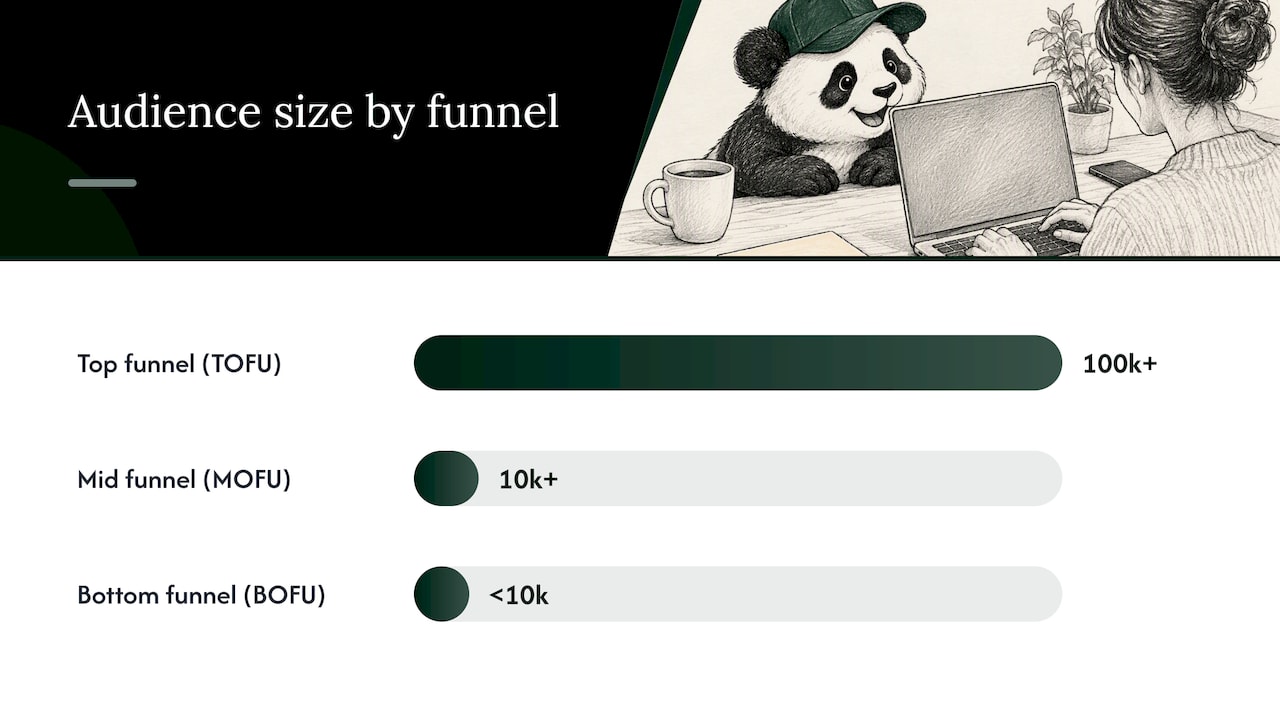
Audience size by funnel stage follows a rough pattern worth remembering: top-of-funnel awareness audiences work best in the hundreds of thousands, mid-funnel consideration audiences perform well in the tens of thousands, and bottom-funnel retargeting or CRM-matched lists can run far smaller since intent is already established.
The most common mistake is building one audience and running it across every objective. A warm retargeting list and a cold prospecting list need separate campaigns with separate messaging, even when the end goal is the same.
Pro Tip: Check your audience count every time you add a filter, not just at the end, so you catch the exact filter that tanks your reach.
Which ad formats and creative choices perform best?
Format follows objective, and mismatching the two is one of the fastest ways to waste a budget. Sponsored Content works for most mid-funnel engagement and retargeting. Video suits product demos and narrative-driven awareness plays. Carousel is built for multi-point value propositions, like showing several use cases in one unit. Message ads land best for event invites or high-intent offers sent directly to inboxes. Lead Gen Forms are purpose-built for Lead Generation campaigns since they pre-fill a prospect’s LinkedIn profile data and cut form friction to almost nothing.
A production checklist before anything goes live:
Headline: state the benefit in the first five words, not the brand name.
Image ratio: 1.91:1 for single image, 1:1 for carousel cards.
Video length: keep under 30 seconds for feed placements, longer is fine for considered B2B demos.
CTA: one action per creative, matched to the objective.
Landing page friction: fewer than five form fields if you route to an external page instead of a Lead Gen Form.
Lead Gen Forms tend to produce higher volume at lower cost per lead since there is no page load or field re-entry, but the trade-off is quality. Pull a sample of 20 leads weekly and check job title and company match against your ideal customer profile before scaling spend further.
LinkedIn drives a large share of B2B paid social spend with strong returns: Dreamdata’s benchmark found LinkedIn commands 41% of B2B paid social budgets with an average ROAS of 121%, ahead of Google Search and Meta. That gap is the argument for giving LinkedIn a proportionally larger share of a B2B paid social budget rather than splitting evenly across platforms.
Run one creative test at a time: swap the headline, hold the image constant, then swap the image and hold the headline. Testing both at once tells you nothing about which change moved the needle.
Setting budgets and bids without guesswork
Daily budgets suit always-on programs where you want LinkedIn’s delivery engine to pace spend across the month. Lifetime budgets suit time-boxed campaigns, an event promotion or a product launch window, where you need spend to exhaust by a fixed date.
Key terms worth knowing before you set a number:
CPM: cost per thousand impressions, best for awareness objectives.
CPC: cost per click, best when traffic volume is the goal.
CPV: cost per view, used for video completion campaigns.
MAX_CONVERSION, MAX_CLICK, MAX_IMPRESSION: optimization targets that tell LinkedIn’s algorithm what outcome to chase with your budget.
The Ad Budget Pricing API returns a minimum bid, maximum bid, and suggested bid alongside daily budget limits for your targeting and objective combination. Pulling those numbers before you set a manual bid keeps your starting economics realistic instead of guessed. Programmatic buyers can combine this with the Audience Counts API to size a pilot budget before a single creative is built.
The practical rule: let automated bidding run through the first week or so while the algorithm learns your audience, then shift to cost control once you have enough delivery data to see where spend is landing relative to your suggested bid range.
Accelerate vs Classic: choosing your setup mode and launch checklist
Accelerate is LinkedIn’s AI-assisted setup mode. It recommends targeting, creative combinations, and bidding in one flow, and it is the faster path to building an initial remarketing pool. According to Hootsuite’s guide, the practical pattern is to start with Accelerate to build audiences quickly, then move to Classic once you need manual control for sequencing and exclusions. Classic is slower to set up but gives you the precision to exclude converted leads, stagger campaign groups, and control bidding campaign by campaign.
A 7-step launch checklist before you hit publish:
Confirm audience size clears the 300-member minimum with room to spare.
Verify the Insight Tag is firing on your landing pages.
Set up the conversion action tied to your objective.
Finalize creative variants and check specs against the format requirements.
Pull suggested bid ranges and set your starting bid inside that range.
Set a frequency cap to avoid fatigue on small audiences.
Run a final QA pass on links, UTM parameters, and form fields.
Once live, check delivery and frequency daily for the first week. Early signals, a frequency climbing past 3 to 4 on a small audience or a cost per result drifting far outside the suggested range, tell you whether to pause and adjust before the budget runs away.
Measurement and tracking: making spend map to pipeline
Install the LinkedIn Insight Tag site-wide, not just on a single landing page, so you can build retargeting audiences from any visitor and track conversions across your funnel. Most tag managers support a one-time install that covers the whole domain.
KPIs should map directly to the objective you chose at the start:
Awareness campaigns: track reach and frequency, not clicks.
Consideration campaigns: track click-through rate and landing page views.
Lead generation campaigns: track form open rate, form completion rate, and cost per lead.
Conversion campaigns: track the conversion event itself, and note that some optimization types require a conversion to be associated with the campaign before it can even activate.
UTM hygiene and CRM sync matter more than most teams treat them. Tag every campaign consistently so pipeline reporting in your CRM matches ad spend reporting in Campaign Manager. For sales cycles where the conversion happens offline, closed deals, demo bookings logged manually, upload offline conversions back into LinkedIn and deduplicate against pixel-based conversions so you are not double-counting the same lead.
A fast sanity check on lead quality: pull your last 20 to 30 leads, check title and company against your ideal customer profile, and flag the campaign if match rate drops noticeably. That five-minute check catches a broken targeting filter long before a monthly report would.
Optimizing and scaling without burning the budget
Give every change time to register before judging it. LinkedIn’s delivery algorithm needs a learning window after any meaningful edit, so changing budget, bid, or creative too often resets that learning and depresses performance. Incremental changes, spaced out, beat frequent overhauls.
A practical optimization sequence:
Test one variable at a time: headline, image, or audience, never all three together.
Judge creative permutations over at least a week of delivery before declaring a winner, since small daily swings are noise on a limited sample.
Scale budget in increments of 20 to 30% rather than doubling overnight, and watch cost per result after each increase.
Expand audiences by loosening one filter at a time, then recheck the Audience Counts estimate before relaunching.
Set a rollback trigger in advance, a cost per result threshold that tells you to pause and revert rather than keep spending.
Lead quality controls should scale alongside budget. As volume grows, sample a consistent percentage of leads each week against your CRM’s qualified-lead definition, and feed that match rate back into which audiences and creatives get more budget next cycle.
Pro Tip: Keep a running log of every change you make and the date, so a performance dip is easy to trace back to the actual cause instead of guessed at.
Campaign sequencing: three playbooks you can copy
A product awareness to demo request sequence runs Video or Sponsored Content against a broad TOFU audience for two to three weeks, then retargets engagers with a Lead Gen Form campaign asking for a demo, tracked on form completion rate and cost per lead.
An event promotion sequence pairs Message Ads to a warm CRM-matched list with Sponsored Content carrying a Lead Gen Form to a colder lookalike audience, both pointed at registration, then shifts to a retargeting campaign for no-shows after the event.
The 90-day conversion framework applies the same staged logic to the landing page side of that same funnel.
What most teams get wrong about LinkedIn ads
Most teams treat LinkedIn ads as a bigger-budget Facebook campaign, and that assumption costs them. The platform’s strength is professional-context targeting, not low-cost reach, and chasing a cheap cost per click here usually means chasing the wrong audience entirely. A 6-week employee advocacy playbook can extend paid reach through organic credibility that no amount of ad spend replicates on its own, something few paid-only programs account for.
The gap that matters most is between activity and pipeline. Dashboards full of impressions and clicks feel productive, but the only number worth defending in a budget review is cost per qualified opportunity. A short pilot, structured and measured against that single number, tells you more in six weeks than a year of unstructured spend. Align’s cross-cultural pilot framework applies that same discipline when a campaign is also crossing into a new market.
— Kalle
How Align TCC turns LinkedIn ad spend into pipeline
Running a disciplined LinkedIn program takes time most marketing teams do not have spare: audience testing, bid monitoring, creative iteration, and CRM reconciliation, all at once. A Demand & Performance service can handle that execution as an extension of your team, while Go-to-Market & Market Entry support applies when the campaign is also opening a new region.

Relevant services for a LinkedIn program include:
Demand & Performance: paid social management, bidding oversight, and conversion tracking setup.
UGC & Content: creative production built for LinkedIn’s format requirements.
Go-to-Market & Market Entry: campaign strategy for brands launching into new regions, including APAC, paired with Leadership Trips for teams who want direct market immersion before committing budget.
If running this in-house is stretching your team thin, a managed partner handles the testing cycles and reporting so your campaigns keep moving. Visit the services page to see current engagement options.
FAQ
What is the minimum audience size for a LinkedIn ad campaign?
LinkedIn requires a target audience of at least 300 members before a campaign can run. Use the Audience Counts API or the facet count in Campaign Manager to confirm your audience clears that floor with margin before launch.
Should I use Accelerate or Classic mode for my first campaign?
Accelerate is faster and uses AI to recommend targeting, creative, and bidding, making it a reasonable starting point for building an initial remarketing pool, according to Hootsuite’s guide. Classic gives manual control over exclusions and sequencing, which matters more once you are running a staged, multi-campaign funnel.
How do I know if LinkedIn ads are worth the cost for B2B?
LinkedIn commands 41% of B2B paid social budgets with an average ROAS of 121%, according to Dreamdata’s benchmark, outperforming Google Search and Meta on that measure. For B2B programs where the sales cycle is long, that return tends to justify a higher cost per click than other platforms.
What does the LinkedIn Insight Tag actually do?
The Insight Tag is a snippet installed site-wide that tracks conversions, builds retargeting audiences from site visitors, and feeds performance data back into Campaign Manager. Install it once across your domain rather than on a single landing page so every campaign can use the data it collects.
How much should I budget for a first LinkedIn ads pilot?
There is no fixed starting number since it depends on your targeting and objective, but the Ad Budget Pricing API returns a suggested bid and daily budget range for your exact combination before you commit spend. Pull that range first, then set your pilot budget to cover at least a full week of delivery at the suggested bid.
Sources
LinkedIn outperforms all B2B ad platforms — Dreamdata (DemandGenReport)
Campaign Management Getting Started - LinkedIn | Microsoft Learn
LinkedIn ads guide: Campaign types, ad specs, and expert tips — Hootsuite
Recommended
RELATED INSIGHTS



LET’S TALK
What are you trying to grow next?
Brand, launch, market entry or performance. Book 30 minutes and tell us what you’re working on.